
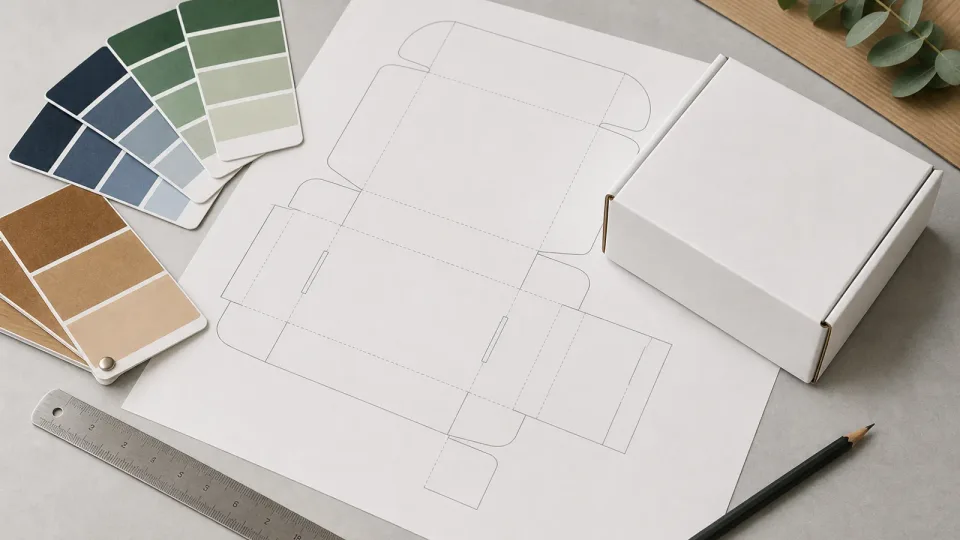
A packaging dieline (also called a die line or dielines file) is the blueprint every custom box job depends on — cut paths, fold lines, panel IDs, and bleed zones that turn brand artwork into a producible mailer or carton. Misread a fold line or safety margin and you get upside-down panels, clipped logos, or rejected proofs. BoxYourBrand produces end-to-end custom packaging for ecommerce and retail brands.
This guide explains how to read dielines, set up artwork, and approve files before production. Pair with custom packaging design artwork for color and export specs.
Dieline anatomy
| Line type | Usually shown as | Meaning |
|---|---|---|
| Cut line | Solid | Blade path — outer perimeter and windows |
| Fold line | Dashed or perforated | Where board bends |
| Bleed | Extended art past cut | Prevents white edges after trim |
| Safety / quiet zone | Inner margin | Keep text and barcodes inside |
| Glue tab | Shaded panel | Adhesive application area (cartons) |
Panel labels (TOP, FRONT, BACK) map artwork to the assembled box — always proof the flat and 3D mockup views. Browse custom mailer boxes for format specs and MOQ tiers.
Dimensions: internal vs external
Dielines reference internal or external dimensions depending on format:
- Mailer boxes — often spec internal fit; external drives DIM weight
- Folding cartons — internal product cavity for retail SKUs
- RSC shippers — internal dimensions for fulfillment carton libraries
Confirm which dimension your dieline uses. Run checks in the box size calculator and packaging size wizard.
Bleed, safety, and barcode zones
Standard packaging artwork bleed practices:
- Bleed: 0.125 in (3 mm) minimum on all cut edges
- Safety margin: 0.25 in (6 mm) from folds and cuts for type and logos
- Barcode / UPC: dedicated quiet zone per GS1 specs — pair with stickers and labels when applying UPCs post-print
- Regulatory panels (food, cosmetics) — reserved blocks per FDA food packaging or cosmetic labeling rules
Background color or texture should extend through bleed; never stop art exactly at trim.
Building artwork in Illustrator
For box dieline Illustrator workflows:
- Place supplier PDF dieline on a locked layer
- Create separate layers: structure (locked), artwork, annotations
- Work in CMYK for print; spot colors for Pantone brand matches
- Convert text to outlines on final export (or embed fonts in PDF)
- Export PDF/X-1a with crop marks only if requested — many plants prefer edge-to-edge bleed without printer marks
Do not scale dielines non-proportionally. If product dimensions change, request a revised dieline — do not stretch panels.
Laser-cut and specialty dies
Custom shapes — round boxes, window patches, unique tucks — use the same dieline discipline with tighter tolerance review. See custom shaped boxes for specialty die considerations.
Proof approval checklist
- Panel orientation matches assembled mockup
- Bleed extends on all edges with graphics
- Barcode scanned from proof PDF
- Interior print aligned with reveal sequence (if applicable)
- Coating and finish notes match quote (matte, gloss, soft-touch)
- Version name and date on proof PDF
Digital proofs are free before production at BoxYourBrand — physical samples recommended for first runs or new dielines.
Get a custom dieline
Request a free quote with product dimensions and format — our team supplies dielines and layout support at no extra cost when you produce with us. Attach calculator output or SKU photos to speed first draft turnaround.
Working with packaging dielines without redraw chaos
A packaging dieline is the contract between design and production. Use the supplier file, keep bleed and safe zones, and version changes explicitly.
| Rule | Why |
|---|---|
| Supplier dieline | Correct folds/glue |
| Bleed | No white edges |
| Layers | Finishes separated |
| Versioning | Reorder safety |
Dieline engineering checklist
- Never redraw fold lines from a PDF preview alone.
- Keep live art inside safe margins.
- Put foil/spot on named layers.
- Soft-proof at 100% scale.
- Archive the approved dieline revision with art.
Engineering notes for dielines
Shared dielines across SKUs save tooling. Name the shared file clearly on every PO.
Dieline pitfalls
- Designing in free canvas sizes
- Text on glue flaps
- Silent dieline edits between proofs
Get production-ready on dielines
Request the dieline for your structure first. We will support artwork setup so packaging dielines survive prepress.
Version control for shared dielines
Name shared dielines clearly and forbid silent edits between proofs. Designers should receive the supplier file, not a flattened marketing PDF.
Archive revision IDs with art. Request the production dieline first when starting packaging artwork so folds and glue flaps stay authoritative.